SMS Opt-In Evidence
EquipSvc Fleet SMS enrollment is administrator-mediated for employees of subscribing construction companies. There is no public self-service SMS signup. The actual enrollment screens are behind authenticated admin access, so this page provides public review evidence of the consent controls and disclosures used in the application, including screenshots of the production enrollment screens captured with fictitious sample data.
Opt-In Paths
- An administrator opens the New User form to enroll one employee.
- An administrator opens the Import Users CSV flow to enroll multiple employees.
In both paths, the administrator must actively select a required SMS consent checkbox before the user record can be created. The checkbox is never preselected. The consent timestamp is stored on the user record.
New User Consent Control
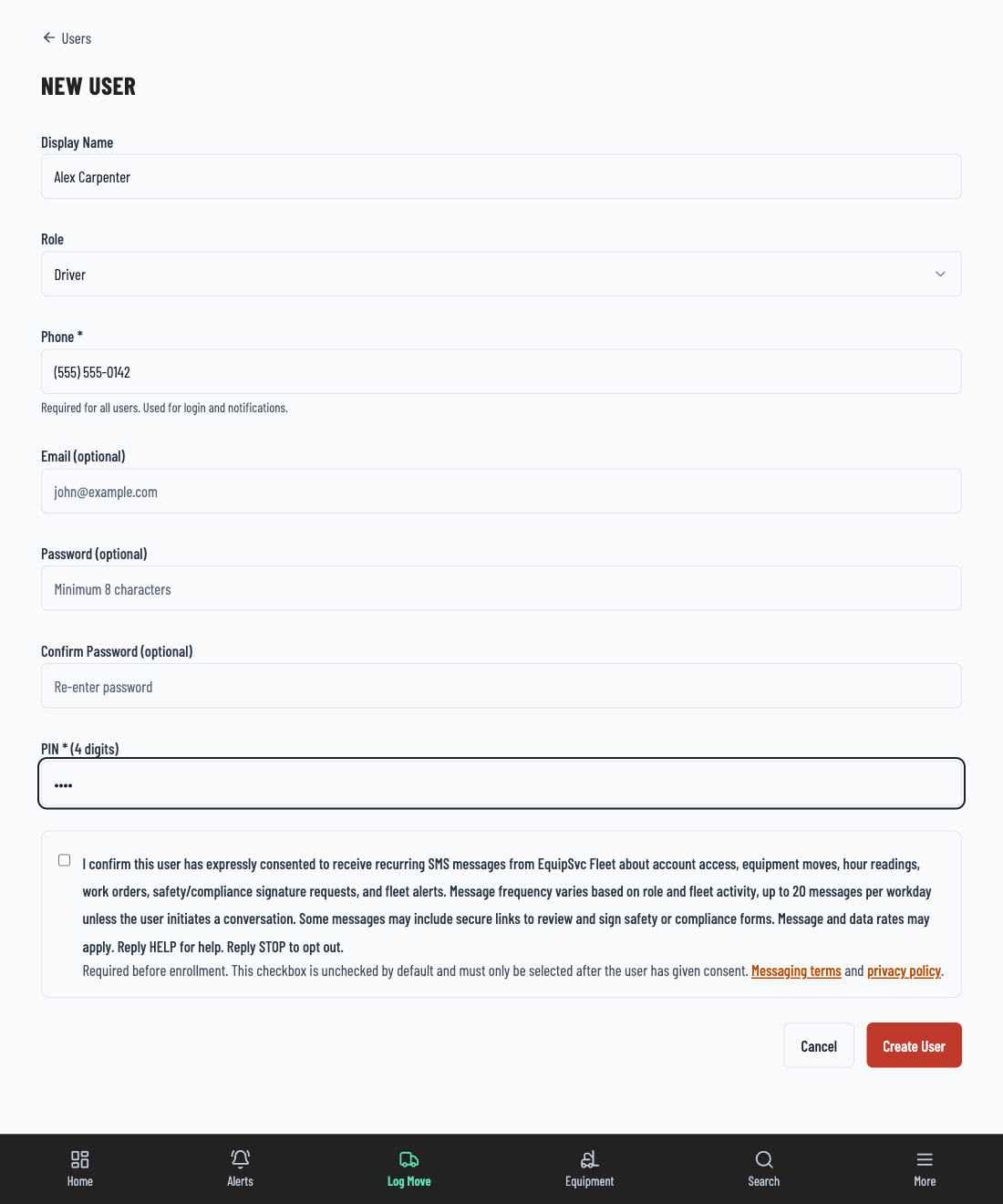
I confirm this user has expressly consented to receive recurring SMS messages from EquipSvc Fleet about account access, equipment moves, hour readings, work orders, safety/compliance signature requests, HR notices, and fleet alerts. Message frequency varies based on role and fleet activity, up to 20 messages per workday unless the user initiates a conversation. Some messages may include secure links to review and sign safety or compliance forms. Message and data rates may apply. Reply HELP for help. Reply STOP to opt out.
Required before enrollment. This checkbox is unchecked by default and must only be selected after the user has given consent. Messaging terms: https://app.equipsvc.com/messaging-terms. Privacy policy: https://app.equipsvc.com/privacy.
Import Users Consent Control
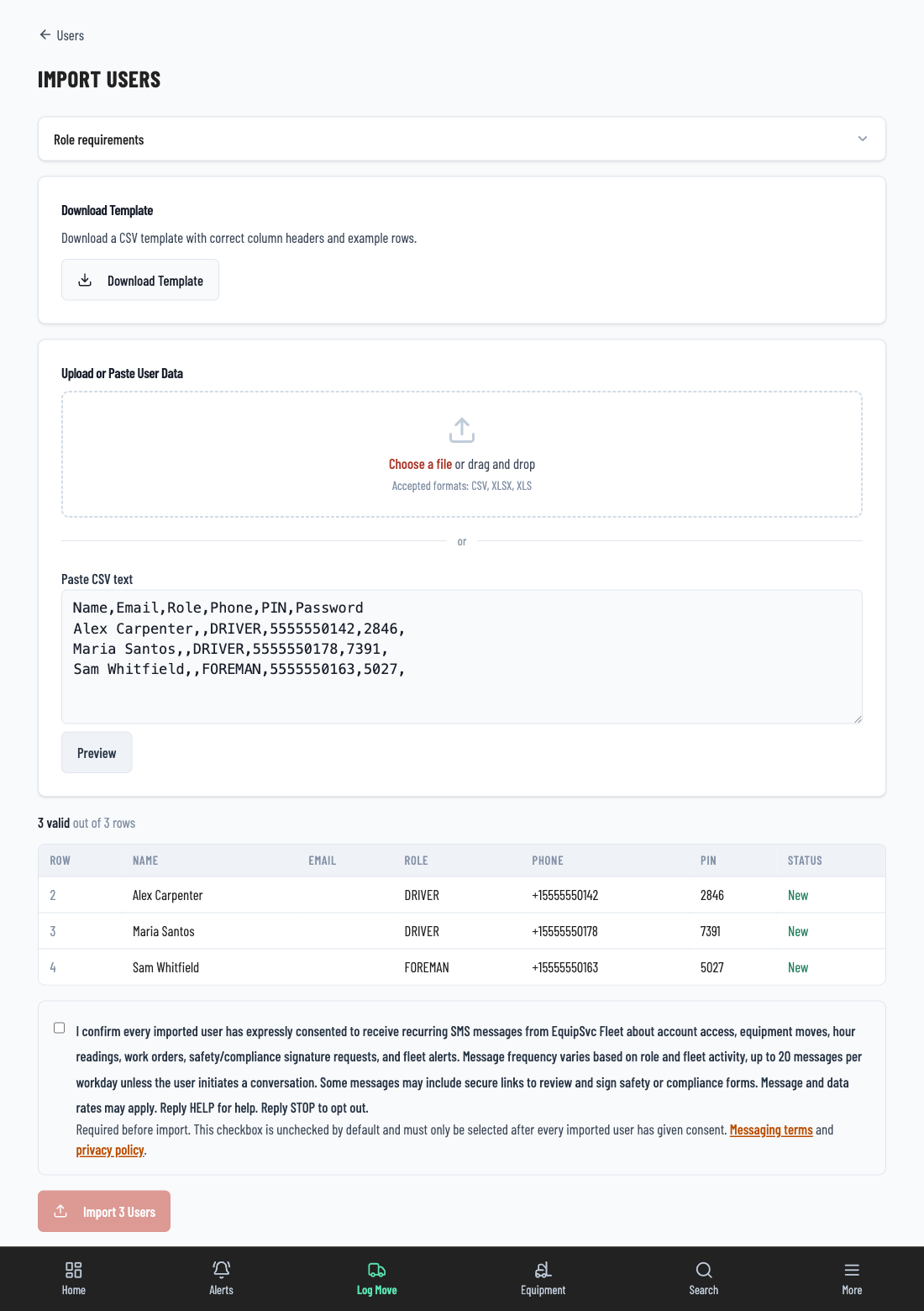
I confirm every imported user has expressly consented to receive recurring SMS messages from EquipSvc Fleet about account access, equipment moves, hour readings, work orders, safety/compliance signature requests, HR notices, and fleet alerts. Message frequency varies based on role and fleet activity, up to 20 messages per workday unless the user initiates a conversation. Some messages may include secure links to review and sign safety or compliance forms. Message and data rates may apply. Reply HELP for help. Reply STOP to opt out.
Required before enrollment. This checkbox is unchecked by default and must only be selected after the user has given consent. Messaging terms: https://app.equipsvc.com/messaging-terms. Privacy policy: https://app.equipsvc.com/privacy.
First Message
After enrollment, the user receives a welcome message before operational SMS traffic:
Welcome to Acme Construction alerts from EquipSvc Fleet. Reply HELP for help. Reply STOP to opt out. Msg&data rates may apply.
Embedded Links
Some operational messages include secure EquipSvc links for safety or compliance form review and signature. These links take the user to an authenticated or tokenized EquipSvc page for the requested work item.
EquipSvc Fleet: Sign the safety/compliance form "Daily JSA": https://app.equipsvc.com/safety/sign/abc123. Reply STOP to opt out.
Opt-Out And Help
Users may opt out at any time by replying STOP, CANCEL, END, QUIT, or UNSUBSCRIBE. Users may request help by replying HELP. The SMS Messaging Terms include program details, message frequency, support contact information, rate disclosures, and opt-out instructions.